
Updates
Zeptocore v8: MIDI slicing and a new visualizer
Zeptocore v8 adds USB MIDI slice triggering and a live performance visualizer. Sample jumps and saves are more reliable too.
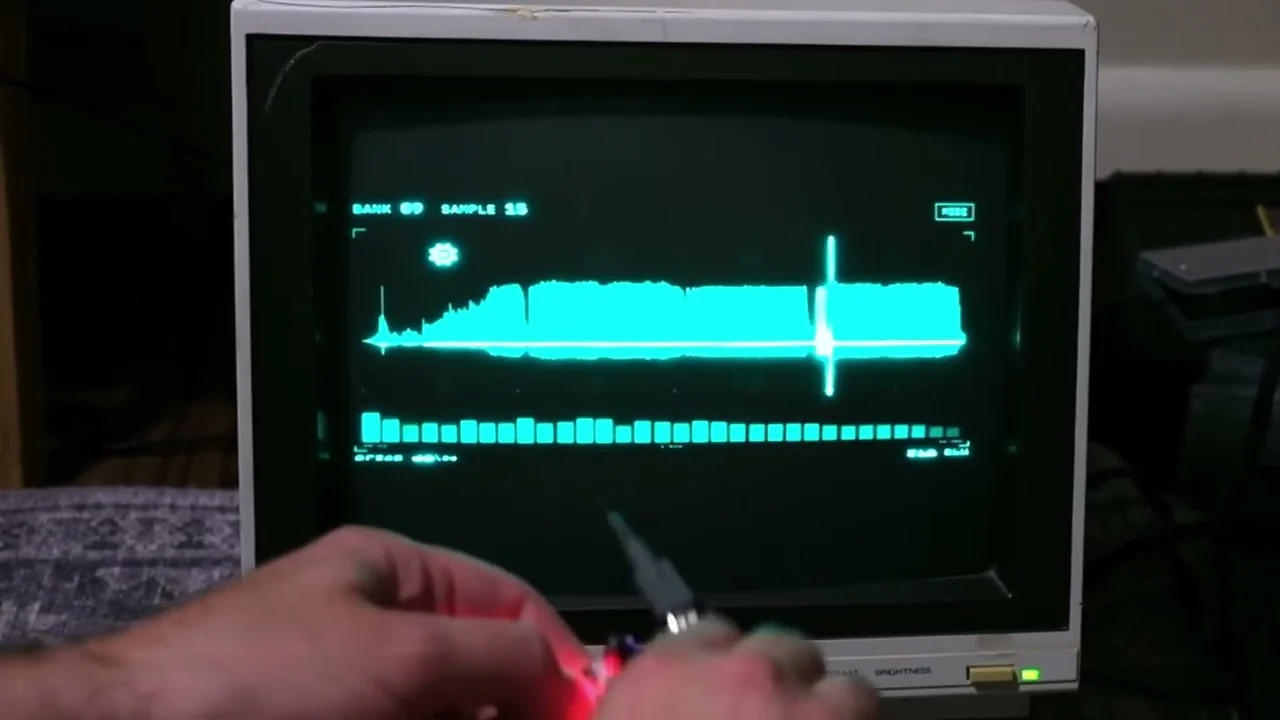
Zeptocore v8 is out. You can now play slices from a MIDI keyboard or DAW. A new visualizer lets you watch what the Zeptocore is doing.
The MIDI part turns the Zeptocore into something you can sequence from the rest of a setup. The visualizer puts the waveform and current slice on a computer screen. It also shows effects and button presses, or you can send the whole thing to an old television if you feel like making it needlessly elaborate.
using MIDI to play slices
Any Zeptocore v8 firmware can receive slice notes over USB MIDI. Connect the Zeptocore to your computer and start playback. Send it notes on MIDI channel 1.
In Ableton Live:
- Open Settings → Link, Tempo & MIDI (called Tempo & MIDI in some versions).
- Find the Zeptocore output and turn on Track and Sync.
- Set the MIDI Clock Type to Pattern. If Live is the clock source, leave Sync off for the Zeptocore input.
- Make a MIDI track and send its output to zeptocore, Ch. 1.
- If you want to record the result, make a separate audio track receiving the Zeptocore's audio output.
Each MIDI note jumps immediately to a slice in the sample that is already playing. The mapping wraps around the number of slices in that sample. With 16 slices, MIDI note 60 selects slice 13 while note 64 wraps back to slice 1. Repeating a note retriggers the slice. A later note replaces the previous selection.
Velocity does not change the loudness or pitch. Note length does not gate the sound either: when the note ends, Zeptocore keeps playing from the selected slice. This means a MIDI clip can describe when to jump without chopping the audio off between notes. MIDI notes also do not start transport or clear a manual mute, so start the Zeptocore (or send MIDI transport) before the clip begins.
Here is the complete setup in Ableton, including a MIDI clip going out to Zeptocore and its audio coming back in to record:
seeing the Zeptocore with the visualizer
The new visualizer follows a performance over USB MIDI. It shows the selected bank and sample beside the waveform and current slice. An estimated playhead follows the sample, while the rest of the screen shows active effects and physical pad presses. A spectrum is drawn from the reference sample.
There is one special requirement: slice tracking needs the visualizer-enabled firmware. The visualizer also needs its own copy of the samples because it is drawing from the reference files, not recording the Zeptocore's audio.
To set it up:
- Flash the Zeptocore v8.0.1 visualizer firmware.
- Copy the entire contents of the Zeptocore SD card into a folder on your computer.
- Download and open the visualizer for your computer.
- Click CHOOSE FOLDER and select the folder that directly contains
bank1,bank2, and the other bank folders. - Connect the Zeptocore over USB. The visualizer will connect automatically when there is one matching MIDI pair; otherwise use CONNECT/MIDI to select it.
The standalone visualizer downloads are pinned to v8.0.1:
They are also collected with the firmware and source on the v8.0.1 release page. The source repository includes the browser/kiosk version and the VST3 and Audio Unit plugin versions for people who want to build those.
The visualizer does not have to stay on a laptop. In this video I am running the browser version on a Raspberry Pi and displaying it on an old Magnavox monochrome CRT from 1986. The cyan phosphor is doing a surprisingly convincing job of making a modern USB sampler look like laboratory equipment.
the rest of the v8 update
There is a lot of less visible work in v8 too:
- Faster jumps inside samples. Zeptocore prepares sample access more efficiently, especially when files are scattered around an SD card. The preparation is automatic and remembered between sessions.
- More room for effects. The filters and tape delay use less processing time without changing their sound.
- Fewer pitch-related freezes. Fast pitched retriggers and the highest MIDI pitch setting no longer hit the same crashes.
- More reliable saves. Existing save files still work. Saved banks and samples restore more reliably.
- Safer sample changes. Alternate samples are detected more consistently and sample changes are better protected. SD-card errors also recover more gracefully.
- More reliable USB MIDI. Concurrent messages no longer get mixed up. Notes and clock can arrive alongside transport or control data.
- Better Ectocore and Ezeptocore clock restarts. External clock resumes on the intended beat, including after a manual stop. The low-latency version responds sooner.
the new knob shortcuts
The secondary knob controls have moved in v8. Hold A or B while turning a knob:
| Hold | Knob 1 (X) | Knob 2 (Y) | Knob 3 (Z) |
|---|---|---|---|
| A | Volume | Filter | Stretch |
| B | Random sequence | Pitch | Tempo |
The complete controls and firmware-upload instructions are in the updated Zeptocore guide.
I have wanted both of these headline features for a while. MIDI makes it much easier to fold Zeptocore into a larger composition, while the visualizer gives a performance another surface without changing the way the instrument itself feels. I hope you have fun with them.
Made by Infinite Digits
Shop this story

The original
zeptocore
The handmade handheld sampler, now with MIDI slice triggering and visualizer support in v8.

Build it yourself
zeptocore kit
Build the open-source Zeptocore and run the same v8 firmware.