
Releases
Pikocore v2: new samples without new firmware
Pikocore v2 moves sample management into the browser and improves real-time stretch. Version 2.4 adds steadier external clocking.
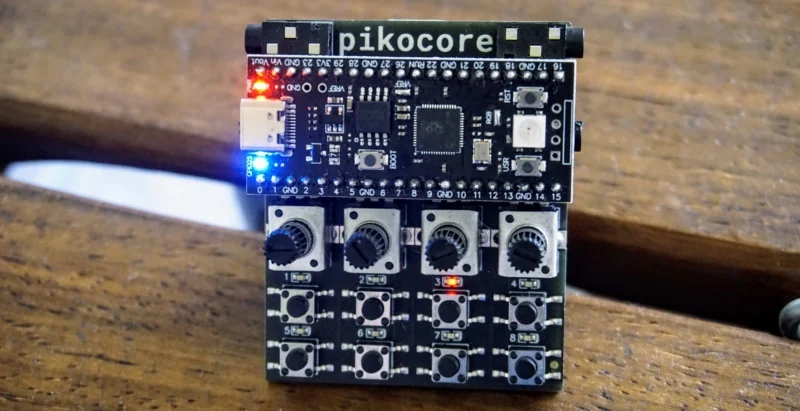
Replacing the pikocore's samples should not require quite as much work as playing it.
That was the awkward part of the original firmware. In Pikocore v1, the samples and the program were packed into the same firmware file. The legacy web uploader could make that file for you, but a new set of sounds still meant making and flashing a new .uf2. A sample change felt like a firmware update because technically it was one.
Pikocore v2 changes that! The firmware and sample bank now live separately, and the Pikocore can talk to a browser over USB. Version 2 arrived in June, and has had several improvements since (now on v2.4). Along the way I rebuilt the real-time stretch and gave the clock input much steadier timing.
the browser became part of pikocore
The browser sample manager is forked from the genius open-source work of @dessertplanet, on MLRws-web. MLRws-web project is a browser companion for MLRws on the Music Thing Modular Workshop Computer, a six-track sample-cutting instrument with on-card storage and a web editor, also a work of incredible genius.
The idea was wonderful: a small open musical computer can expose its samples to a useful browser interface. In v2, I have adapted that work to Pikocore's flash layout and USB serial protocol.
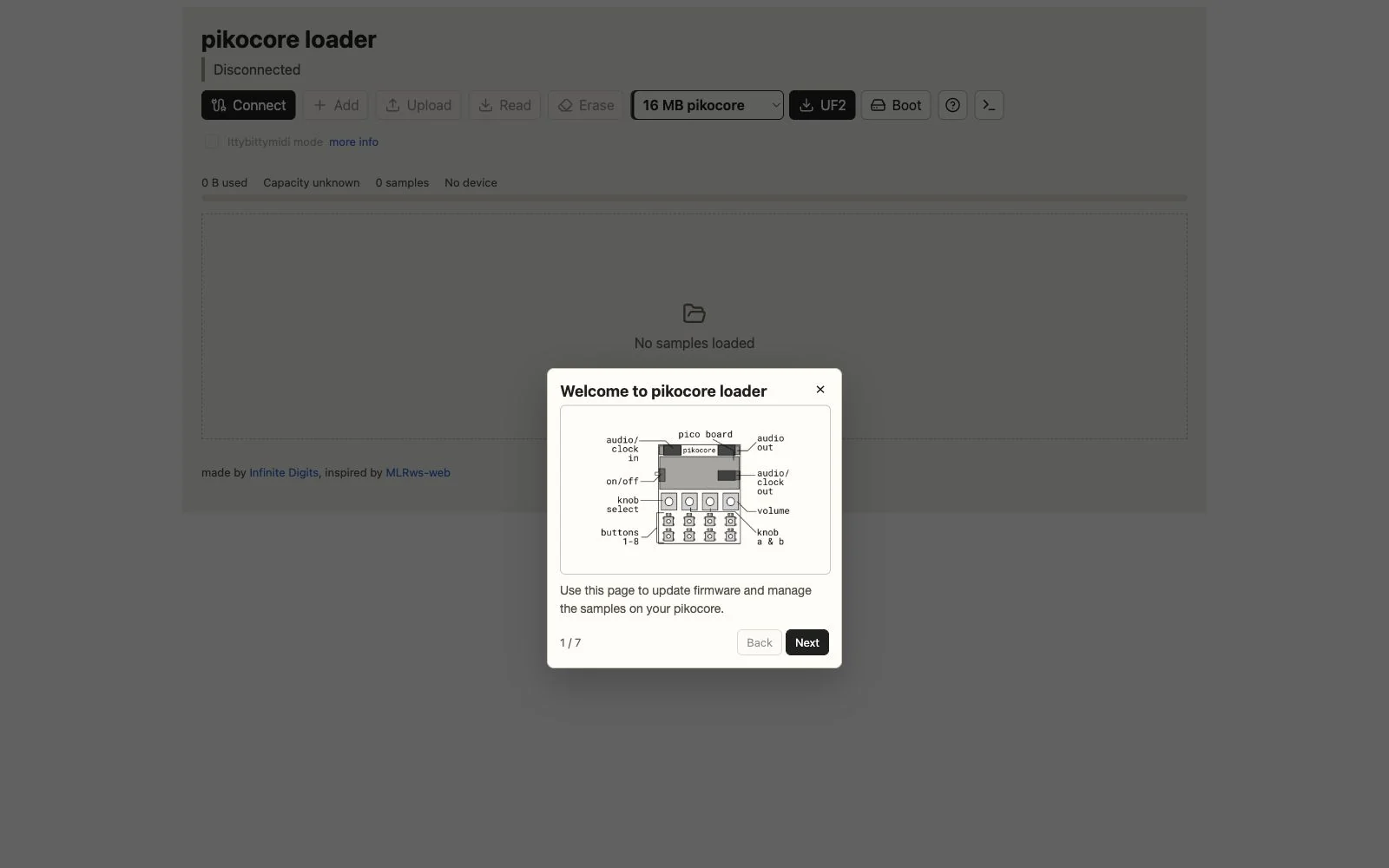
The manager runs locally. Your audio does not visit a server before it reaches the Pikocore. The browser converts the audio and writes the finished bank directly over USB. This is faster and no longer depends on my server.
what the new workflow looks like
To get started, open the Pikocore v2 firmware and sample loader in a browser with Web Serial support, such as Chrome or Edge (and recently, Firefox, I believe). The question-mark button opens a tour, but the basic workflow is:
- Choose the firmware that matches your Pikocore. The normal Infinite Digits version is 16 MB, with 4 MB and 2 MB builds for other boards.
- Download the
.uf2, put Pikocore into BOOTSEL drive mode, and copy it to theRPI-RP2drive. Once recent v2 firmware is installed, the loader's Boot button can ask the device to enter that mode. - Press Connect and choose the Pikocore serial port. The browser reads the bank already on the device, so you edit what is actually there.
- Add audio files or drag them into the page. The loader converts them and shows waveforms, names, BPM, beat counts, duration, and size.
- Preview samples, correct their names or timing, change their order, or remove them. A meter keeps track of the remaining flash.
- Press Upload to write the bank back. Read reloads it later, and Erase clears it when that is really what you intended.
Two filename tricks are still useful. bpm150 means 150 BPM and beats8 means eight beats. Without them, the browser makes an estimate that you can correct before uploading.
default samples
Moving from v1 to v2 replaces the old firmware and samples, so save the audio or keep the stock sample bank nearby. Afterward, changing the instrument is a sample-management job, not a build process.
stretch that actually stretches
The stretch control in v1 was a clever timing trick...but it changed how quickly playback advanced, which was cheap enough for the RP2040 and appropriately rough, but it could sound abrupt while moving.
In v2 I replaced it with a small real-time granular stretcher. Two overlapping grains read the sample at its natural rate while moving through it more slowly. They are crossfaded with interpolated reads. This is still a tiny 8-bit instrument, so the goal is not invisible studio correction. The new stretch still sounds like Pikocore, but its pitch is steadier. It works while the loop is running.
A little stretch can loosen a loop without dragging its pitch downward. A lot pulls the sound apart and gives the jump and retrigger controls more material to chew on. The filter benefits too. It is now an effect I reach for very often.
a clock that is less easily startled
Version 2.4 is mostly about the clock input. The new clock code filters measured intervals and rejects bounce or isolated bad edges. It also recognizes missed pulses. Phase corrections ease into place instead of jumping. The clock acquires a new tempo when the incoming signal really changes and pauses cleanly when that signal disappears. Pulse input can be set to quarter, eighth, or sixteenth notes. Ittybittymidi mode follows MIDI clock and its transport messages.
The v2.4 loader also shows lock state, BPM, jitter, phase error, rejected events, and pulse division. Most people will never need those numbers. I needed them to make the clock boring in the best possible way.
one update for the whole family
Pikocore v2 is not limited to the assembled handheld. It is compatible with the Pikocore XL from Erica Synths, the P4L PIKOCOREURO, and the homemade and remixed instruments collected in The Pikocore Underground. Choose the 2 MB, 4 MB, or 16 MB build that matches the RP2040 board in the instrument.
should I upgrade?
If you use a Pikocore v1, I think the answer is yes. The controls, sequencer, saves, probabilities, button combinations, PO sync, and lo-fi sound are still there. Samples are much easier to replace, stretching is better while the instrument is running, and external clocking is substantially more stable.
When changing a bank takes a few browser clicks, I change banks more often. Pikocore stops being the device with whichever breaks happened to be inside when I last made firmware. I can prepare it for a track or spend an afternoon making noise with a new set of sounds.
Install v2.4 with the browser loader. The source and releases are on GitHub. If you need the instrument itself, start with an assembled Pikocore or the DIY kit. The bare circuit board is available too.
Then put something strange in it.
Made by Infinite Digits
Shop this story

Ready to play
pikocore
The assembled handheld lo-fi sample mangler, ready for Pikocore v2.4.

Build your own
pikocore kit
The complete through-hole kit for making a Pikocore at home.

Start from the board
pikocore circuit board
A Pikocore circuit board for builders who want to source their own parts.